AI-Assisted Cyberattacks Are Moving Faster: Is Your Business Ready After Hours?
November 23, 2026
A security alert arrives at 10 p.m. on a Saturday. Who sees it? Who decides whether it needs immediate attention? And who can actually limit the damage if an attacker is already inside?
Those questions are becoming more urgent as attackers use artificial intelligence to speed up familiar parts of a cyberattack. The FBI has warned that malicious actors are using ARTEX, a security-testing framework, against organizations around the world. In some observed intrusions, attackers moved from initial targeting to privileged access in under three hours. Privileged access means an account has elevated permissions that can give someone broad control over systems or data. [1]
That timeline is an example from observed activity, not a deadline that applies to every attack. Still, it is a useful reminder that a security plan needs to work when your office is closed as well as when your IT team is at its desks.
ARTEX was created for authorized security testing: looking for weaknesses in systems with the owner’s permission. It connects to external AI models and can automate parts of that work. The FBI reports that malicious actors have also used it to identify targets, find weaknesses, and carry out stages of an intrusion. [1]
The underlying weaknesses are often familiar. An overlooked application, an unpatched system, a reused password, or an exposed credential can give an attacker a starting point. Automation can help an attacker investigate more potential openings and move quickly when one works.
WIRED reports that the tool’s original repository was taken down, but copies remain available. The broader issue is therefore bigger than one product: organizations need to be ready for attackers who can use automation to make existing weaknesses easier to find and exploit. [2]
Find the Systems Attackers Can Reach
Start with an inventory of internet-facing systems: the websites, applications, remote access services, and other technology reachable from outside your organization. Ask who owns each one, whether it is still needed, and how quickly its security updates are applied.
Look beyond the main company website. A supplier portal, an older application used by one department, or a connection to a third-party service may receive less attention than core systems. The FBI specifically identifies these peripheral systems as potential targets. [1]
For example, a manufacturer might maintain a vendor portal that was set up years ago for sharing production documents. Confirm that its software is supported, its administrator accounts are current, and its access is limited to the people who still need it. Assign an owner to follow through on any issues and agree on a timeframe for fixing them.
A legitimate username and password can make an intrusion look like ordinary activity. Review accounts with elevated permissions, remove unused accounts, and replace default passwords. Require multifactor authentication wherever supported, especially for email, remote access, administrative accounts, and vendor access. This adds a second verification step to a password.
Check where credentials and access keys are stored, too. If a key or password has been exposed, revoke or rotate it promptly and investigate whether it was used. Give third parties only the access they need, for as long as they need it, and review that access regularly.
These steps do not eliminate every route into a system. They do reduce opportunities for an attacker to reuse an old account or turn one exposed credential into wider access.
Turn Security Alerts Into Action
Monitoring can reveal unusual sign-ins, suspicious account changes, and unexpected traffic. But an alert is only the beginning of a response. Someone needs to assess it, decide what it means, and take the next appropriate action.
Establish who is responsible for reviewing alerts at night, on weekends, and during holidays. Confirm how that person is reached and who covers when they are unavailable. The response plan should identify who can disable a compromised account, isolate an affected device, or contact a vendor. Those actions can interrupt business operations, so the people involved need clear authority and escalation paths before an incident occurs.
Practice the handoff with a short tabletop exercise: walk through a realistic scenario together and talk through each decision. For instance, assume an administrator account signs in from an unfamiliar location on Saturday night. Who receives the alert? What information is available? Who can suspend the account, and who needs to be informed? Write down any uncertainty and assign someone to resolve it.
Can Your Team Respond on a Saturday Night?
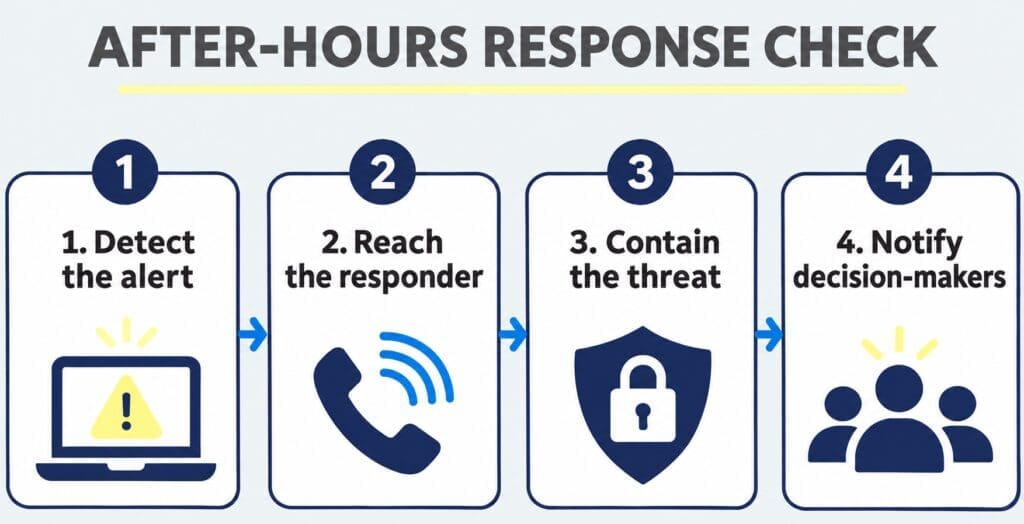
A useful test is to trace one serious alert from detection to containment. Ask your IT or security provider to explain who monitors it, how quickly it is escalated, what response actions are included, and when your leadership team would be contacted. Check the scope of coverage and responsibilities in your agreement; do not assume every alert receives the same response.
Then test the contact information and repeat the exercise periodically. Changes in staff, vendors, and technology can quietly make an old plan unreliable. A clear process helps your team make decisions under pressure, even when the people normally in the office are away.
Build a Response Plan That Fits Your Business
Faster attacks make preparation valuable. Review your internet-facing systems, tighten access to important accounts, and make sure an after-hours alert reaches someone who can act. Prioritize the systems and services your organization depends on most, then address gaps in manageable steps.
Pearl Solutions Group provides cybersecurity services and 24/7 monitoring and support, with fully managed and co-managed options. To discuss your current coverage and response responsibilities, contact Pearl Solutions Group for a security conversation.
Plus you are very kind and helpful. I'm grateful. Thanks, Ryan! Jeanne
Read Moreread less
J. Derer
11/10/2026
Great service!
Read Moreread less
B. Vorwerk
11/09/2026
We have used Pearl's services for several years and they are always quick to respond, courteous, knowledgeable and successful in fixing any issues I have. I have worked with Adam numerous times and he has always been great! I recommend this business for anyone that needs IT support.
Read Moreread less
N. Hopkins
10/07/2026
Giving a shout out to Nicholas Lembeck. He always handles any ticket I submit in timely manner. I appreciate his support!Tim JungCSWR
Read Moreread less
T. Jung
10/06/2026
Nicholas and Adam were both tech experts in their field and were able to assist in no time flat! Great work!
Read Moreread less
O. Carmona
10/05/2026
Nicholas provided excellent IT assistance and an impressive knowledge of paleontology to boot.
Read Moreread less
R. Krosley
9/30/2026
We utilize Peal at my place of employment to help out with our computer support and IT services. I find them to be extremely helpful and knowledgeable any time I need them for something. Recently I had an issue that I just could not figure out on my own and Brandi Griffin was assigned to help me out. Brandi diligently worked with me to get my issue solved, which I was very thankful for! Brandi was responsive, knowledgeable and accurate with the work she helped me with, great experience!
Read Moreread less
J. Ryan
9/29/2026
Nicholas Lembeck was a quick response and went above and beyond at every step of the way
Read Moreread less
A. L.
9/29/2026
Outstanding IT support
Read Moreread less
J. Randolph
8/10/2026
Ryan was great to work with! He took the time to figure out my issue and get it fully resolved. He was knowledgeable and patient.
Read Moreread less
L. Medlock
8/04/2026
Nicholas Lembeck and Nick Barker were extremely diligent and knowledgeable about the problem at hand while able to offer unique insight to my business' operations. They went above and beyond at every step of the way
Read Moreread less
A. L.
8/03/2026
Fast Friendly Service! Bravo over and over again!Thank you very much!
Read Moreread less
D. Hedges
8/03/2026
Fantastic customer service and excellent response time. Adam's patience and knowledge was outstanding. Definitely would recommend 10/10 experience!
Read Moreread less
J. Engle
7/06/2026
Adam is the best! Our call lasted nearly 50 minutes, and my printer was experiencing several different issues. Adam patiently explored multiple solutions, remained determined throughout the entire process, and never gave up. In the end, he not only fixed the printer, but it is now working better than it ever has before.Please pass along my sincere thanks and appreciation to Adam. He provided outstanding service, and I couldn't be more grateful. King Adam!
Read Moreread less
B. Morley
6/24/2026
Adam S at Pearl is the best support rep I have ever worked with! He was able to resolve all of my requests quickly, professionally, and went above and beyond. He is also a great conversationalist to boot and is very entertaining! Thanks Adam! :)
Read Moreread less
C. Sands
6/18/2026
Chance was his usual efficient self, he corrected my issue and very quickly as usual! Thank you!
Read Moreread less
R.
6/12/2026
Pearl is always great at helping us with our many ticket printer issues and Seth was no exception. Within minutes, we had resolution on our ticket printer and were back up and running. Thanks!
Read Moreread less
S. S
4/30/2026
Adam from Pearl Solutions was very helpful in resolving my problem. He took the time to really show me what I needed to do. Much appreciated:)
Read Moreread less
m. espinosa
4/24/2026
Seth was awesome in addressing my minor issue promptly. I hope he my tech every time I have an issue.
Read Moreread less
B. Ken
4/10/2026
I got a new phone over the weekend and needed my Outlook synced. Chance was quick to respond and was able to get my new phone synced in no time.
Read Moreread less
J. Kennedy
4/07/2026
I had a great experience with Pearl Solutions Group. The support team was quick to respond and extremely helpful in resolving my IT issue. What stood out most was how clearly everything was explained and how patient they were throughout the process. They made what could have been a frustrating situation feel easy and manageable. Very professional, knowledgeable, and reliable service.
Read Moreread less
N.
4/04/2026
Adam is the best! So helpful!
Read Moreread less
R. Seabaugh
3/31/2026
Seth did a great to establish user software I needed to perform a task quickly and efficiently.
Read Moreread less
e. gomez
3/25/2026
I always have a good experience when using Pearl Solutions. They are very professional and helpful. They do not rush you through anything and make sure you are fully taken care of before getting off of the phone. My last experience with Adam was professional and very helpful. :)
Read Moreread less
K. Obermeyer
3/24/2026
Adam got right to the root of my issue and fixed it.
Read Moreread less
D. Schroeder
3/20/2026
Gregg and his team are always so quick to respond and help even what is likely a simple problem but never make you feel like it is! Thank you!
Read Moreread less
K. Williams
3/17/2026
Adam is an exceptional member of the IT team whose expertise, professionalism, and dedication consistently exceed expectations. He approaches every task with a solutions-focused mindset and demonstrates a deep technical understanding that makes him a trusted resource across the organization.
Read Moreread less
K.
3/13/2026
Ryan helped me solve an issue I had, and it was seamless. thank you Ryan Jokuti for your help
Read Moreread less
B. Henton
3/13/2026
You get great service from Pearl Solutions Group. Brandi did a great job for me, preventing me from getting a message that could have done some damage if I had opened it.
Read Moreread less
B. Reiser
3/12/2026
Answered all my Random questions and remedied my issues!!!Thank you
Read Moreread less
D. Fisher
3/02/2026
Spencer Hoppes helped me with a password issue. I had submitted the request 2 weeks prior and no response. the email was sent to the wrong email address (my error). Once Spencer was assigned my ticket, within minutes he was on the phone with me. My issue was resolved quickly. He was so helpful and made sure I had no other issues before we disconnected the call. People like Spencer make technical issues not so bad!
Read Moreread less
B. Henton
3/02/2026
Seth found and fixed my issue immediately. The response time and resolution time was excellent!!
Read Moreread less
D. Schroeder
2/27/2026
Adam is the model of customer service in I.T. today! He listened, understood with limited knowledge. He quickly troubleshooted and resolved a half a day issue! KEEP HIM!
Read Moreread less
P. Department
2/26/2026
I work for a company that uses their system, and they have never failed us! From the astonishing customer service to the quick responses, highly recommend them to anyone!
Read Moreread less
c. morrison
2/20/2026
Pearl is such a pleasure to work with! They understand the problem and help resolve it in an expedient and professional manner that gets me up and running quickly!
Read Moreread less
R. Morales
2/12/2026
Brendan and Luke were great to work with while starting my new job. They helped me resolve my IT issues quickly and made what could have been a stressful process feel easy. Both of them were kind, professional, and kept me informed. I really appreciated how responsive and communicative they were, and they didn’t stop until everything was fully resolved. Great support and a great first impression. Thank you both!
Read Moreread less
C. Friend
2/06/2026
Adam was great. Please give him all the money!
Read Moreread less
J. Robbins
1/29/2026
Very helpful group! We appreciate you all.
Read Moreread less
A. Owens
1/09/2026
Matt also does a great job of being professional, and patient as we navigated the issues - I appreciate the patience and dedication to the tasks at hand!
Read Moreread less
J. Anna
12/19/2025
Adam was very knowledgeable, professional, and kind. He was able to quickly resolve my problem.
Read Moreread less
J. Kempker
12/11/2025
Using Pearl for IT onboarding support at my new job. Seth and Chance were a huge help, fast and friendly in resolving my issues! Good stuff!
Read Moreread less
S. Coffey
11/21/2025
Chance was the best! "Super-fast response and resolution to my issue. Thanks."
Read Moreread less
J. Henry
11/12/2025
Luke was great. Fixed me up in no time. Thanks Luke
Read Moreread less
R. Borden
11/04/2025
Very good and prompt service!
Read Moreread less
D. Faulkner
11/04/2025
Nicholas Lembeck did a document search for us in old unavailable documents and found what we needed. It saved a huge amount of work and headache and will help us with the regulatory agencies
Read Moreread less
T. Thomas
10/17/2025
Courteous company and back up and running in no time.
Read Moreread less
R. Voissement
10/13/2025
Adam was an absolute Saint! Thorough, detail oriented, and downright pleasant. I'm very thankful that our IT team isn't a team I will dread contacting and i may even get some laughs along the way to problem resolution.
Read Moreread less
K. Donaldson
9/26/2025
Branding a great job of fixing the issue.
Read Moreread less
D. Jackson
9/24/2025
I needed help setting up the accounting email to my outlook account and Nicholas Lembeck helped me. It was done perfectly and quickly. He then let me know about it being fixed.
Read Moreread less
P. Duckworth
9/22/2025
Luke crushed it today troubleshooting a few items on my end. I have also had 5 star experiences with Matt and Brian. Great team over at Pearl!
Read Moreread less
T. Bohnert
9/19/2025
Brandi did an amazing job catching a phishing email that i thought was legit.
Read Moreread less
G. Bowers
9/15/2025
Nicholas, along with all of the other representatives from Pearl, are fantastic. They consistently work issues all the way to resolution with nothing left partially complete.
Read Moreread less
J. Ward
9/09/2025
Nick was attentive, professional and very prompt! He provided excellent customer service.
Read Moreread less
s. davis
9/08/2025
Great experience working with Pearl - extremely helpful and professional!
Read Moreread less
J. Salinas
9/04/2025
Always have a great experience with the team in getting my tech issues resolved quickly!
Read Moreread less
J. Augustine
9/02/2025
Adam did a tremendous job with our team. Kind, courteous, and patient, Pearl has continued to provide excellent service over our company's tenancy.
Read Moreread less
A. Reinhardt
8/29/2025
I had a great experience working with Nicholas on an issue I had. He was quick to respond and had a solution right away. My company uses Peal and they are always patient and eager to help!
Read Moreread less
I. Sassen
8/26/2025
I called in with the issue, it was solved and explained to me for the future All done in minutes What more could you ask for
Read Moreread less
B.
8/20/2025
Great service, responsive. Explained the reason why the email could not be released. Protected my email from a hacker. Happy with the servie.
Read Moreread less
C. Janean
8/12/2025
Nicholas L. was great, took initiative, investigated and solved my issue quickly.
Read Moreread less
L.
8/06/2025
My Company uses Pearl and has for years now! The service is always good and staff is always helpful. Today Seth Pruitt went above and beyond to help me out with software issues. Not only did he correct my work issues, but took the time to help with personal issues that were also impacting my programs and emails. Thank you so much for all your help! You made my day!!
Read Moreread less
A. Frisella
8/05/2025
Nicholas was very helpful and knowledgeable. Excellent people skill.
Read Moreread less
H. Nguyen
7/31/2025
Fast, expert, and thorough problem resolution!
Read Moreread less
A. Faiello
7/25/2025
Very dependable and reliable. Fast but great service with 100% satisfaction. I highly recommend Pearl Solutions for my protection.
Read Moreread less
B. Hollamon
7/24/2025
I have been using Pearl for several years. Their service has always been exceptional. My experience yesterday with Adam was a perfect example. He responded quickly discover the problem and fixed the issue. Thank you Pearl for your world class service.
Read Moreread less
D. sabada
7/24/2025
Ethan was very friendly, efficient, and helpful throughout.
Read Moreread less
K. Frazier
7/24/2025
Expertise is just one phone call away!
Read Moreread less
M. Hillin
7/23/2025
It's always good to give credit where credit is due. Ethan saved SharePoint one day after I broke it. I was beyond concerned with a mistake I made. I put in a ticket, and he called me less than 30 minutes after. It was a relief to know that the problem was fixed before anyone realized there was a problem. I would also like to recognize Nick, the unsung hero who is always here and ready to lend a hand. He stopped what he was doing to help me get set up after I came on board. I couldn't have done it without him.
Read Moreread less
J. Thompson
7/23/2025
Adam was so helpful and patient with me while fixing an issue with my authenticator/email on my new phone. I appreciate his help and willingness to walk through all the steps with me as many times as necessary to get my email in working order! GREAT JOB!
Read Moreread less
C. Hageman
7/21/2025
Extremely helpful and they have a very fast response time. Would highly recommend to anyone looking for a dedicated and efficient team.
Read Moreread less
Z. Brown
4/02/2025
quick response time resolved the issue kind
Read Moreread less
j. Hodge
3/26/2025
I had the pleasure of working with Pearl Solutions Group, and I couldn't be more impressed with their service! From start to finish, their team provided outstanding customer support. They were incredibly responsive, always answering my questions and addressing any concerns in a timely manner. The attention to detail and willingness to go above and beyond made my experience seamless. The entire team was not only professional but also genuinely helpful, ensuring I received the best solutions for my needs. If you're looking for a reliable and customer-focused team, I highly recommend Pearl Solutions Group!
Read Moreread less
K. Cline
3/19/2025
Willis was wonderful to work with.
Read Moreread less
T. Bolden
3/19/2025
Pearl is always fast to respond, understands my workload, and gets me up and running in no time. Friendly, courteous, effective.
Read Moreread less
T. Pletcher
3/02/2025
Always timely in their response and respond with the technical skill to fix my problem. The last was a VPN connection issue that Willis, though he didn't have the answer at hand, put me on hold and sought out help internally. He returned and quickly identified and resolved the issue.
Read Moreread less
K. Thompson
3/02/2025
Service tech was courteous and very helpful. Definitely streamlined the process
Read Moreread less
J. Noto
3/02/2025
I don't have to open tickets very often. But in the past year when I do open a ticket, it is resolved in a VERY timely manner and the first time! Willis did a great job!
Read Moreread less
C. Gary
3/02/2025
I had a small issue with a file and I was not actually not working but needed it fixed before Monday am. Seth kept in communication with me throughout the day until I was back at my computer to allow him to login. He had the issue fixed in less than 5 minutes. His patience with me and his knowledge of the issue made this much easier. Everytime I work with Seth I have wonderful experience.
Read Moreread less
C. Air
3/02/2025
Excellent customer service
Read Moreread less
C. Corey
3/02/2025
Issue was addressed and solved very quickly and professionally.
Read Moreread less
A. Sevier
3/02/2025
Pearl Technicians can always be counted on for great service and are very knowledge. THX ETHAN!!!
Read Moreread less
M. Stringer
2/02/2025
Had a great experience with your Tech, Willis. He was very polite and got me up and going in no time. Thank you.
Read Moreread less
t. holderman
2/02/2025
I love working with Pearl Solutions Group! They take care of all of our computer networks for us and help us get through issues very quickly! I highly recommend them!
Read Moreread less
A. Riley
2/02/2025
Always responsive and first call resolution.
Read Moreread less
A. Slinkard
2/02/2025
Brandi gave me a quick response this morning and was on top of the problem! I appreciate her kindness and ability to get me back on track with my work! I've always had quick responses and professional interactions anytime I've reached out to Pearl for support! They have a great team!
Read Moreread less
A. Rye
1/02/2025
Always a great experience!
Read Moreread less
A. Albaugh
1/02/2025
I received a new laptop at work and needed help getting access to my OneNote files. Michael Morrisey went out of his way to help me and saved me from recreating MANY files! Great customer service!
Read Moreread less
D. McGuire
1/02/2025
I recently worked with Seth Pruitt to get my VPN connection and access to my companies remote servers back up after having to wipe a MacBook Pro. Seth was professional and explanitory every step of the way. I highly recommend if you have the option, ask for Seth to help you with your IT needs.
Read Moreread less
R. Lister
1/02/2025
These gentlemen were patient with me, understood my needs, followed through with their assurances and succeeded in meeting my various needs. They provided excellent customer service at each opportunity!! Despite how stressed I was, these guys fixed problems I was having AND put a smile on my face!! Thanks from Ree!!
Read Moreread less
M. Batchen
1/02/2025
Pearl Solutions Group is the BEST! Thank you for your tremendous service and attention.
Read Moreread less
S. St.
1/02/2025
I work with pearl with my company and they are always very nice and helpful! I’ve gone through iPad fixes to simple email fixes and they are also extremely thorough and easy to contact
Read Moreread less
A. Delannoy
12/02/2024
Jacob was great to work with and super responsive to my calls and requests needed to set up two new employees computers.
Read Moreread less
K. Krueger
12/02/2024
Helpful and friendly
Read Moreread less
G. Marshall
12/02/2024
Chance did an amazing job with quick support to help get our devices up & running! Very impressed with your team.
Read Moreread less
C. Davis
12/02/2024
I was able to work with Brendan on a couple service tickets and the level of help, support and professionalism was top notch! Super smooth experience.
Read Moreread less
K. Miller
12/02/2024
Ethan and Pearl Solutions were wonderful in helping my advertising agency transition into our new office. From minor inconveniences to entire device transfers, the team was helpful every step of the way. Would highly recommend to anyone in need of technical support!
Read Moreread less
C. Wright
12/02/2024
Cookie Consent
We use cookies to improve your experience on our site. By using our site, you consent to cookies.
Cookie Preferences
Manage your cookie preferences below:
Essential cookies enable basic functions and are necessary for the proper function of the website.
Name
Description
Duration
Cookie Preferences
This cookie is used to store the user's cookie consent preferences.
30 days
Google Tag Manager simplifies the management of marketing tags on your website without code changes.
Name
Description
Duration
cookiePreferences
Registers cookie preferences of a user
2 years
td
Registers statistical data on users' behaviour on the website. Used for internal analytics by the website operator.
session
Statistics cookies collect information anonymously. This information helps us understand how visitors use our website.
Clarity is a web analytics service that tracks and reports website traffic.
Used to monitor number of Google Analytics server requests when using Google Tag Manager
1 minute
_gid
ID used to identify users for 24 hours after last activity
24 hours
_ga_
ID used to identify users
2 years
_gali
Used by Google Analytics to determine which links on a page are being clicked
30 seconds
_gac_
Contains information related to marketing campaigns of the user. These are shared with Google AdWords / Google Ads when the Google Ads and Google Analytics accounts are linked together.
90 days
__utmx
Used to determine whether a user is included in an A / B or Multivariate test.
18 months
__utmv
Contains custom information set by the web developer via the _setCustomVar method in Google Analytics. This cookie is updated every time new data is sent to the Google Analytics server.
2 years after last activity
__utmz
Contains information about the traffic source or campaign that directed user to the website. The cookie is set when the GA.js javascript is loaded and updated when data is sent to the Google Anaytics server
6 months after last activity
__utmc
Used only with old Urchin versions of Google Analytics and not with GA.js. Was used to distinguish between new sessions and visits at the end of a session.
End of session (browser)
__utmb
Used to distinguish new sessions and visits. This cookie is set when the GA.js javascript library is loaded and there is no existing __utmb cookie. The cookie is updated every time data is sent to the Google Analytics server.
30 minutes after last activity
__utmt
Used to monitor number of Google Analytics server requests
10 minutes
__utma
ID used to identify users and sessions
2 years after last activity
Marketing cookies are used to follow visitors to websites. The intention is to show ads that are relevant and engaging to the individual user.
Facebook Pixel is a web analytics service that tracks and reports website traffic.
This cookie is used to prevent the chat widget welcome message from appearing again for one day after it is dismissed.
1 day
messagesUtk
This cookie is used to recognize visitors who chat with you via the chatflows tool. If the visitor leaves your site before they're added as a contact, they will have this cookie associated with their browser.
13 months
__hssrc
Whenever HubSpot changes the session cookie, this cookie is also set to determine if the visitor has restarted their browser.
session
__hssc
This cookie keeps track of sessions.
30 minutes
hubspotutk
This cookie keeps track of a visitor's identity. It is passed to HubSpot on form submission and used when deduplicating contacts.
13 months
__hstc
The main cookie for tracking visitors.
13 months
hs_langswitcher_choice
This cookie is used to save the visitor's selected language choice when viewing pages in multiple languages.
2 years
hs-membership-csrf
This cookie is used to ensure that content membership logins cannot be forged.
session
__hsmem
This cookie is set when visitors log in to a HubSpot-hosted site.
1 year
hubspotapi
This cookie allows the user to access the app with the correct permissions.
7 days
hs-messages-is-open
This cookie is used to determine and save whether the chat widget is open for future visits.
30 minutes
__hs_notify_banner_dismiss
This cookie is used when the website uses a Notify consent banner type.
180 days
hs_ab_test
This cookie is used to consistently serve visitors the same version of an A/B test page they’ve seen before.
session
__hs_gpc_banner_dismiss
This cookie is used when the Global Privacy Control banner is dismissed.
180 days
__hs_initial_opt_in
This cookie is used to prevent the banner from always displaying when visitors are browsing in strict mode.
7 days
__hs_cookie_cat_pref
This cookie is used to record the categories a visitor consented to.
6 months
__hs_do_not_track
This cookie can be set to prevent the tracking code from sending any information to HubSpot.
13 months
hubspotapi-csrf
This is used for CSRF prevention - preventing third party websites from accessing your data. Expires after a year.
1 year
__hs_opt_out
This cookie is used by the opt-in privacy policy to remember not to ask the visitor to accept cookies again.
13 months
hubspotapi-prefs
This is used with the hubspotapi cookie to remember whether the user checked the 'remember me' box (controls the expiration of the main cookie's authentication).
1 Year
You can find more information in our Cookie Policy and .